ClickUp Review (2026)Free Forever, Then $9 a Seat
 By Daan Haket · Tested hands-on · written with an AI assistant · who does what
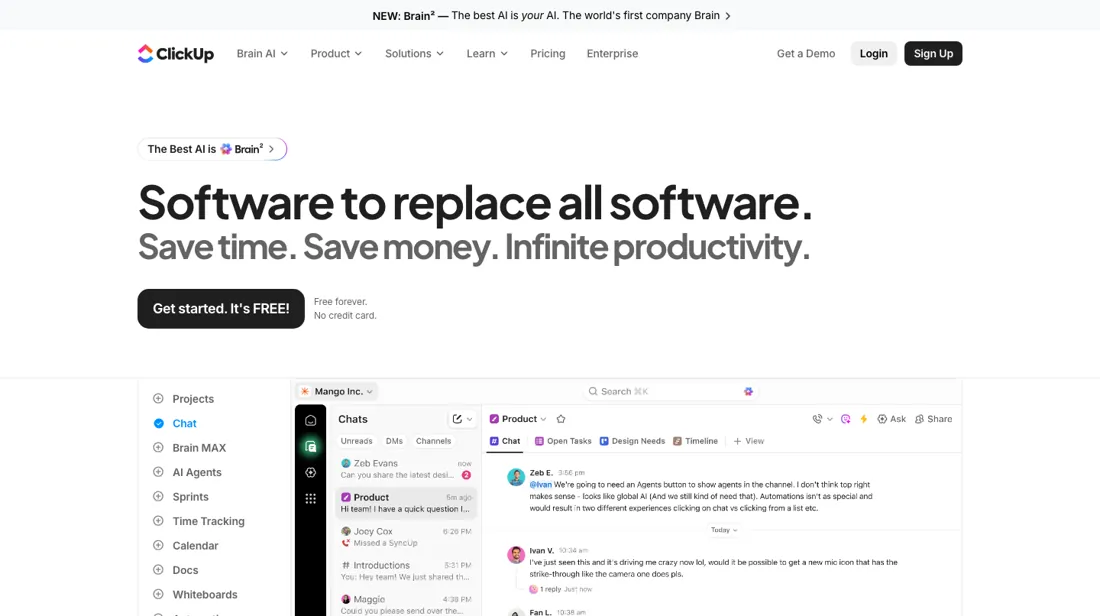
The everything-app breadth is also the downside: it's feature-dense with a real learning curve, and teams can drown in options. Powerful and cheap per seat, but only if you'll actually configure and adopt it. Below, monday.com is the yardstick we hold it against.
- Best for Teams replacing several tools with one work app
- Not for small teams wanting a tool adopted in a day
From $9 · Core, per user · per month, billed yearly · read 2026-11-24
Try ClickUp free →Affiliate link: we may earn a commission if you sign up, at no extra cost to you. It never changes our verdict.
Is ClickUp right for you?
Your pain“My team's tasks, docs, goals and reports are spread over several separate tools.”
Does ClickUp solve it?Buyers say yesBuyer reports (G2 and Capterra, Aug 2026): teams say it really takes over several tools, and it holds about 4.7 across more than 10,000 G2 reviews.
Your planCore, $9 per user a month billed yearly
Your pain“Routing between our tools still needs a human, and integration calls get throttled.”
Does ClickUp solve it?PartlyPricing page (21 Nov 2026): Business includes 10,000 automation actions a month and webhooks; ClickUp's API docs still put Business at 100 requests per minute per token.
Your planBusiness, $17 per user a month billed yearly
- Small teams wanting a tool adopted in a day. Buyer reports (G2 and Capterra, Aug 2026): the learning curve is the second most-cited complaint on G2, and three weeks to onboard the team is a common phrasing. Better fit: Hive.
The “Try” buttons are affiliate links: we may earn a commission if you sign up, at no extra cost to you, and it never changes our verdict.
Thinking of switching? ClickUp alternatives
Transparency: the “Visit” links on this page are affiliate links: we may earn a commission if you sign up, at no extra cost to you. No vendor can pay for a better review or verdict. How we make money →
Which ClickUp plan do you need?
4 plans, 3 questions, no signup.
Answer three quick questions to see your plan.
Your plan
Free Forever
$0
Unlimited tasks and free members, 60 MB of storage
Your plan
Core
$9 per user/month billed yearly
Removes the storage cap; 1,000 automation actions a month
Your plan
Business
$17 per user/month billed yearly
10,000 automation actions a month, webhooks and automation integrations
Your plan
Enterprise
Quoted
1M automation actions a month, SSO/SCIM, HIPAA with a BAA
Probably not ClickUp
From your answers, look at Todoist instead. Why ↓
Prices as we read them on 2026-11-24; check the checkout before you pay. The plan button is an affiliate link: we may earn a commission, at no extra cost to you. The Todoist link is an affiliate link too.
What ClickUp costs at your size
What each plan costs a month on annual billing (monthly billing below it), per user from ClickUp’s own pricing page. The cheapest plan at each size is marked. Enterprise is quote only.
| Users | Free Forever | Core | Business | Enterprise | Max |
|---|---|---|---|---|---|
| 1 user | $0Best value at this size | $9 | $17 | quote only | $100 |
| 3 users | $0Best value at this size | $27 | $51 | quote only | $300 |
| 5 users | $0Best value at this size | $45 | $85 | quote only | $500 |
| 10 users | $0Best value at this size | $90 | $170 | quote only | $1,000 |
| 25 users | $0Best value at this size | $225 | $425 | quote only | $2,500 |
| 50 users | $0Best value at this size | $450 | $850 | quote only | $5,000 |
Prices read 2026-11-24; tax excluded unless the vendor says otherwise. Calculated by our cost engine; the same numbers are in our open data.
See current prices on ClickUp →Exit test (measured 2026-10-23)
- Export route
- Settings > Imports / Exports > Export items, choose a location, Start export
- Formats
- CSV
- Attachments included
- Not tested
- Re-import tested
- No
- Lost on export
- Nothing we entered was missing for our three tasks
Formats describe this export route; offered formats may not have been inspected. Full exit test and scope ↓
1 notice on ClickUp’s status page in the last 90 days
Across the 37 vendor status pages we follow, the median is 3 in the same window.
- 2026-11-05 Maintenance: Database Maintenance
Counted from the vendor’s own status page feed, read 2026-11-24. These are notices the vendor chose to publish, not measured uptime; they can include maintenance and services beyond this product.
Tested by our team on 23 October 2026 on the Free Forever plan with one seat and no payment method: we created the account and our AI assistant ran the test in our browser. We imported a CSV file with three made-up tasks (each with a status, a start date, a due date and a description), compared what arrived with the file, and exported the whole workspace.
How we tested
- Inspected the Free Forever workspace and billing screen
- Imported three tasks with mapped statuses and date columns
- Compared the imported task groups, description and dates
- Started an all-location item export and opened the task CSV
Test files: fixture.csv SHA-256: 12cd6aa578e08553186061c6507a965fd85e07e8dc039965780a24683ff171f2
- The spreadsheet importer (Settings > Imports / Exports) matched all five columns of our CSV to ClickUp fields automatically, then mapped the three status values one to one and previewed 3 valid rows before 'Import into ClickUp'. The three tasks landed in a new list, each under its own status, and the task we opened had the right status, both dates and its description.
- The import history said 'Imported 23 items' for our file of three rows, while the new list held exactly the three tasks. The counter and the result did not agree; we did not find out what the 23 counts.
- The workspace export downloaded within seconds as a CSV of 15 rows (the 12 sample tasks plus our 3) with 34 columns, including task ID, link, content, status, dates, subtasks, attachments, assignees, tags, priority, location, time tracking, checklists and comments. All three of our tasks came back with status, description and both dates.
Pricing (2026)
✓ Pricing re-verified 24 Nov 2026
| Plan | Price | What you get |
|---|---|---|
| Free Forever | $0 | unlimited tasks and free members, 60 MB of storage, 100 automation actions a month |
| Core | $9 per user/mo billed yearly | regular price shown as $12; unlimited storage, 1,000 automation actions a month, 1,000 pooled AI credits per user |
| Business | $17 per user/mo billed yearly | regular price shown as $25; 10,000 automation actions a month, webhooks, 1,500 AI credits per user |
| Enterprise | quoted | 1M automation actions a month, 3,000 AI credits per user, SSO/SCIM, HIPAA with a BAA |
| Max | $100 per user/mo billed yearly | regular price shown as $120; everything in Enterprise plus 10,000 AI credits per user |
| This tool | $9 | 2nd cheapest of 5 |
| Cheapest | $8 | Miro |
| Median | $10 | |
| Most expensive | $15 | SmartSuite |
Lowest paid entry price per seat a month, billed annually, in USD, among the 5 work management tools we have researched (read between 2026-09-23 and 2026-11-24). Only tools priced in the same unit and on the same billing are compared. This is not a market survey, and cheapest is not best.
(corrected 2026-11-21, read on clickup.com/pricing in a rendered browser) ClickUp has rebuilt its plan ladder since our 30 September reading. Free Forever stays at $0 with unlimited tasks, unlimited free members and 60MB of storage. The paid plans are now Core at $9 per user/month billed yearly (the card strikes through a regular price of $12), Business at $17 billed yearly (regular price $25), Enterprise on quote, and a new Max plan at $100 per user/month billed yearly (regular price $120).
The page says yearly billing saves up to 33%; the month-to-month figures did not render when we switched the billing tab, so we do not quote them. AI now sits inside the paid plans instead of on top: Core carries a Brain² trial with 1,000 AI credits per user a month, Business 1,500, Enterprise 3,000 and Max 10,000, pooled across the Workspace, with extra credits at $10 per 10,000.
An upgrade covers every member of the Workspace, and the refund window is 30 days. Re-read 24 November 2026 on clickup.com/pricing: Core $9 (regular $12), Business $17 (regular $25) and Max $100 (regular $120) per user a month billed yearly, Enterprise on quote, the same pooled AI credits (1K, 1.5K, 3K and 10K per user) and extra credits at $10 per 10K; unchanged. Plans change, so check the live price on their site before you buy.
Category context: Operations & Workflow. Across the 57 tools in this category that we researched with a public US-dollar price, the median entry price is $20 a month (lowest paid plan as listed, per seat where the vendor prices per seat). ClickUp’s entry price of $9 a month sits below that median. Compare pricing conditions in the Software Cost Atlas →
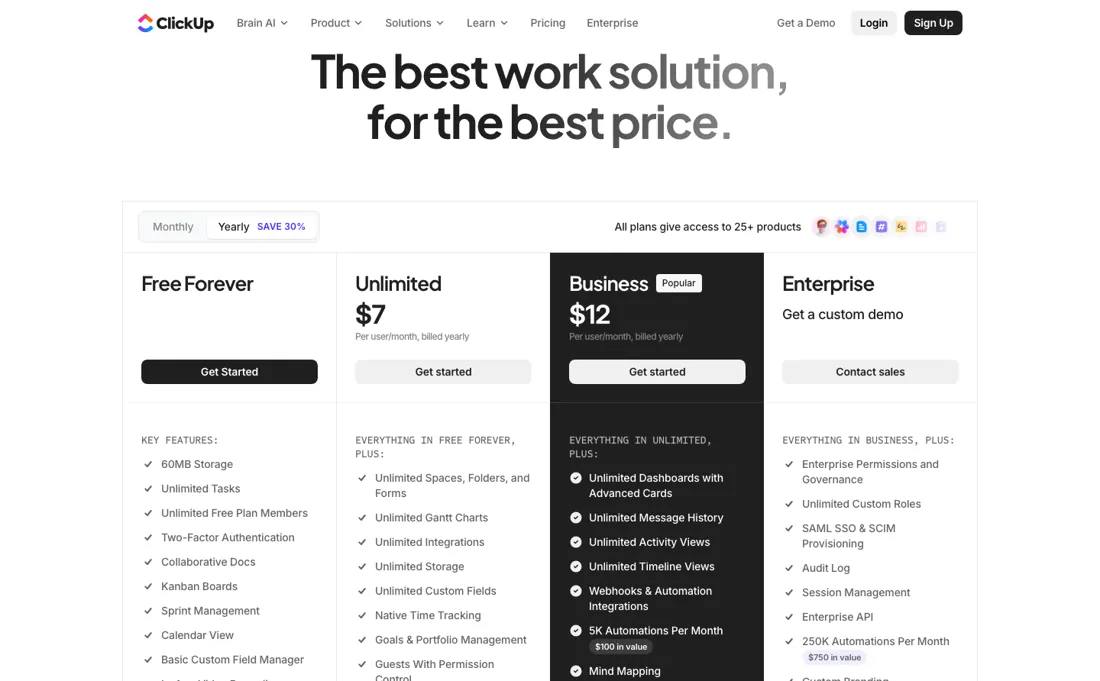
Correction after re-checking: Corrected 21 November 2026. Until then this page priced ClickUp from Unlimited at $7 per user/month billed yearly ($10 monthly) and Business at $12 ($19 monthly), with AI sold on top as Brain AI ($9) and Everything AI ($28), as read on 30 September 2026. The pricing page of 21 November no longer lists Unlimited or the two AI add-ons: the paid tiers are Core $9, Business $17 and Max $100 per user/month billed yearly, each with AI credits included.
What the price did
We read ClickUp’s own pricing page on a schedule and keep every reading, so this is our record of the page. It is not a forecast, and not someone else’s summary. A change appears here only after we confirmed the new price on the page itself.
Our monthly captures of clickup.com/pricing on 7 July and 2 August 2026 are byte-identical, the same page-text hash both months, carrying the same figures: $7 Unlimited, $12 Business, $9 Brain AI and $28 Everything AI. Reading the page again by hand on 13 August 2026 returned those same four amounts, plus $10 and $19 as the month-to-month rates for Unlimited and Business. Nothing has moved in that window. Re-read on 30 September 2026: $7 and $10, $12 and $19, $9 and $28 all unchanged, and the automation limits per tier (100, 1,000, 5,000 and 250,000 executions a month) exactly as in August. Re-read on 21 November 2026 the ladder had changed: Unlimited ($7/$10) and the Brain AI ($9) and Everything AI ($28) add-ons were gone, Core read $9 and Business $17 per user/month billed yearly with $12 and $25 struck through as regular prices, a new Max plan read $100 ($120), and AI credits came included per plan.
ClickUp’s pricing page, as we read it
Watch the video review
⚡ Short on time? Watch the 30-second verdict Short.
What ClickUp does
The 'everything app' for project and work management. Centralize your tasks, docs, sprints, and team communication in one hub.
What buyers report about ClickUp
Hands-on: tested 2026-10-23Reported by buyers: G2 and Capterra, read August 2026 (Capterra read 13 August 2026)
Themes from the buyer-review sites listed at the foot of this page, read in August 2026 (Capterra read 13 August 2026). We tested ClickUp ourselves on 2026-10-23, but one test is a narrow sample, so here is what other buyers report. We summarise it here because the complaints are usually the part a vendor page leaves out.
- • It does replace several tools, which is why it rates around 4.7 across more than 10,000 G2 reviews.
- • Once teams are through the setup, usability scores are high: 88% on G2.
- • Developers on Capterra (4.6 across 4,616 reviews) single out the API rather than the boards: a plain API token with no OAuth dance, endpoints grouped the way the UI is, predictable payloads and clearly documented rate limits: one reviewer had task creation, updates and status changes working within an hour.
- • The learning curve is the second most-cited complaint on G2, and "took three weeks to onboard the team" is a common phrasing. Budget for that.
- • Slowness. "Slow loading" is tagged in over 1,100 G2 reviews, and reviewers still report lag in large workspaces after the 3.0 speed work.
- • Feature overload, "too many features I don't use" recurs, and it makes the tool harder to teach.
- • Docs and the mobile app trail the desktop experience.
- • Capterra reviewers name the mobile app specifically as weaker than the desktop app, and one adds that getting the full feature set there means moving up a plan for what is largely the same thing.
- • The lag complaints there are specific: stalls when tasks and subtasks are added in quick succession, and slow-loading dashboards in large workspaces with many subtasks.
- • Automations are called shallow for anything complex: several Capterra reviewers say non-trivial triggers need workarounds instead of working natively.
When the paid plan is worth it
The Free Forever tier is not a trial: it carries unlimited tasks and unlimited free members, but ClickUp caps it at 60MB of storage and 100 automation actions a month. Storage is the ceiling that arrives first. The moment work involves attachments rather than checklists, the free plan runs out. Core at $9 per user/month billed yearly removes the storage cap and adds custom fields, unlimited Gantt charts and 1,000 automation actions.
Business at $17 per user/month billed yearly is the tier that matters once routing is supposed to run without a human: 10,000 automation actions a month, webhooks and automation integrations, and 1,500 pooled AI credits per user. On the 21 November 2026 page AI sits inside the plans, so the old sum of seat plus Brain AI add-on no longer applies; extra credits cost $10 per 10,000. Max at $100 per user adds unlimited AI fields and Autopilot Agents on top of the Enterprise controls.
The rough rule: pay for Core when files enter the workflow, pay for Business when automations carry real load, and stay free if a small group only tracks tasks. An upgrade covers every member of the Workspace, not only the people who need the feature. What upgrading does not fix at these tiers: API throughput. ClickUp's developer docs (read 21 November 2026) put Unlimited and Business at 100 requests per minute per token, with only Business Plus (1,000) and Enterprise (10,000) above that, and they do not yet list Core or Max, so confirm the limit before paying for an integration-heavy setup.
Our monthly capture read this pricing page in October 2026 and again in November 2026. The price history below explains what changed.
What we found running ClickUp ourselves
The first findings are at the top of this page. The rest:
- Dates in the export appear as epoch values and as text with a time zone, set to 04:00 although our file held only dates.
- Onboarding took seven screens, with an extra confirmation to skip inviting people ('Skip without inviting'). Billing showed 'Free Forever, 1 seat · $0 / seat' and 'No payment methods', and the workspace came with three sample lists holding 12 tasks.
- The upload window inside ClickUp did not respond to our browser tool, so we loaded the file in the same import session through a separate tab; that is a quirk of our test setup, not something we can pin on ClickUp.
Exit test: can you take your data out?
On 23 October 2026, in the Free Forever workspace from this test, we exported the whole workspace with ClickUp's own export and checked whether our three imported test tasks came back with status and dates. We did not re-import the file. Test date: 23 Oct 2026. We describe the friction rather than score it; this is one run with synthetic records, not a verdict on ClickUp.
| What we checked | What we saw |
|---|---|
| Came along in the export |
|
| Lost in the export |
|
| Awkward but not lost | Dates come out as epoch values and as text with a time zone, set to 04:00 although our CSV held only a date. Attachments, comments and checklists sit as JSON-like text in a single column. |
| Export route | Settings > Imports / Exports > Export items, choose a location, Start export; the CSV downloads directly in the page within seconds. |
| Export format | CSV with 34 columns per task; attachments, comments and checklists as JSON-like text in a column. |
| Re-importing the export | Not tested. |
| Cancelling | Not tested. |
What the exit test does not show:
- Re-importing the export into a separate list
- Exporting views (List or Table) and the limit on that in Free Forever
- Attachments, comments and subtasks in the export
How this compares: across our exit tests of 330 tools, 60 gave us an export file. ClickUp gave us an export file in which no test data was missing or changed. Report 08: can you get your data out?
Mail in the first 14 days
11 emails in the 14-day window; first email after signup: unknown (exact signup time not recorded); 0 with an explicit offer.
Retained inbox and junk only; removed or archived mail is outside this observation. Ambiguous supplier attribution is excluded. Day numbers use elapsed 24-hour periods since the recorded signup date at midnight Europe/Amsterdam; the signup hour is unknown. Offer flags quote literal subject/body text. Replies in our own correspondence (support tickets, our comment requests) are excluded; one-time codes, our own address, our account name and our name are replaced in brackets.
| Day | Time (UTC) | Sender | Literal subject | Folder | Offer evidence |
|---|---|---|---|---|---|
| Day 0 | 2026-10-23 20:06:06 UTC | ClickUp team / clickup.com | ClickUp Verification Code: [code] | inbox | |
| Day 0 | 2026-10-23 20:11:07 UTC | ClickUp team / info.clickup.com | Welcome to ClickUp! | inbox | |
| Day 0 | 2026-10-23 20:14:23 UTC | ClickUp team / clickup.com | Import Complete | inbox | |
| Day 0 | 2026-10-23 20:15:28 UTC | ClickUp team / clickup.com | Export completed! | inbox | |
| Day 1 | 2026-10-24 05:01:53 UTC | ClickUp team / clickup.com | Daily Summary | AIBM Test | inbox | |
| Day 2 | 2026-10-25 06:15:36 UTC | ClickUp team / clickup.com | Daily Summary | AIBM Test | inbox | |
| Day 3 | 2026-10-26 06:03:18 UTC | ClickUp team / clickup.com | Daily Summary | AIBM Test | inbox | |
| Day 4 | 2026-10-27 06:08:10 UTC | ClickUp team / clickup.com | Daily Summary | AIBM Test | inbox | |
| Day 5 | 2026-10-28 06:28:58 UTC | ClickUp team / clickup.com | Daily Summary | AIBM Test | inbox | |
| Day 6 | 2026-10-29 06:16:56 UTC | ClickUp team / clickup.com | Daily Summary | AIBM Test | inbox | |
| Day 7 | 2026-10-30 06:10:40 UTC | ClickUp team / clickup.com | Daily Summary | AIBM Test | inbox |
Screenshots from our test (click to enlarge)
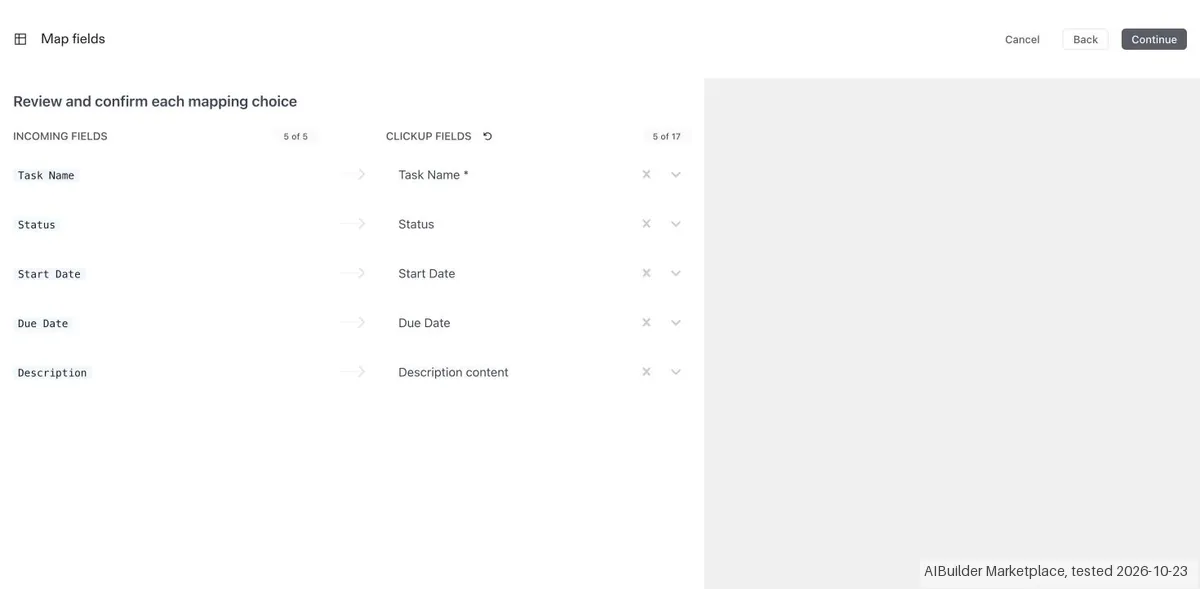
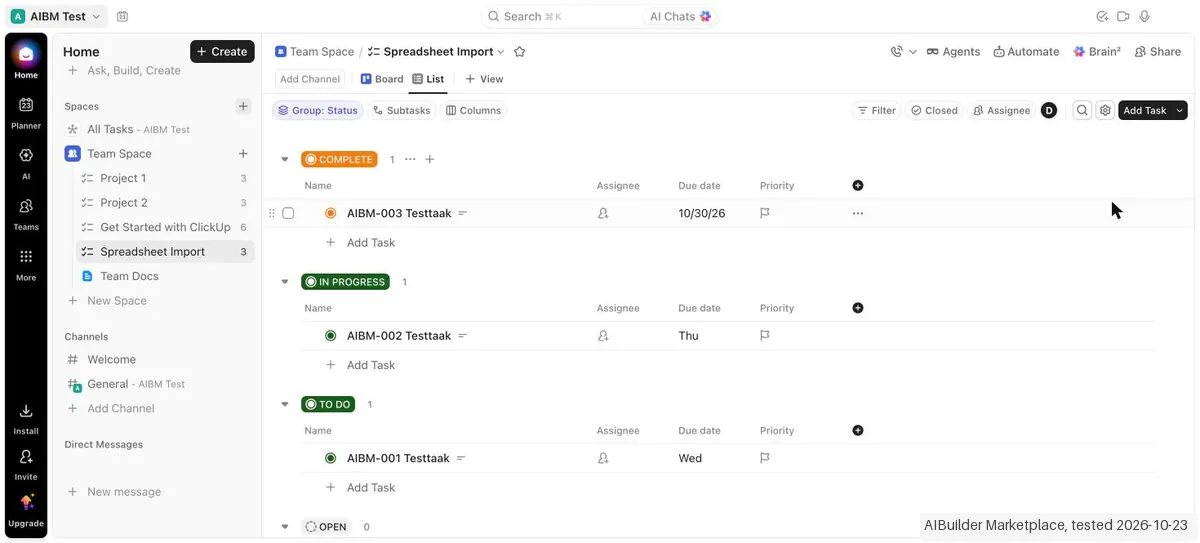

What this test does not show:
- Re-importing the export
- Attachments and the storage limit
- Exporting views (List, Table, Form) and the Free Forever limit of five
- Automations, ClickUp Brain and multiple users
Most of our reviews are researched rather than run. How we review explains which is which, and why we do not pretend otherwise.
How to actually use ClickUp
ClickUp does little until the Hierarchy exists. The vendor's onboarding guide puts Workspace structure first (Spaces, then Folders, then Lists, then tasks) and explicitly asks teams to agree what each level represents before anyone creates one. Roles come next: Guests, Members, Admins, Owner and custom roles are decided during setup, and permission mistakes surface afterwards as people seeing the wrong Spaces. Then import. ClickUp publishes importers for Asana, Monday.com, Jira, Confluence, Trello, Todoist, Basecamp, Wrike, Notion and CSV or Excel, and lets the result land in a brand new Space or be mapped onto an existing Folder.
For CSV the import page promises only that any number of columns can be imported in any order and mapped into Lists; it documents no validation step, so mapping is checked by eye. The practical stall is not the account itself but the structural decision plus the cleanup once a migration has turned boards and Jira issue types into Lists that do not match how the team actually works.
Where this section comes from: our research notes (143 words)
ClickUp's own team onboarding guide (https://clickup.com/team-onboarding) for Hierarchy-first setup and the role model, and ClickUp's import page (https://clickup.com/import) for the supported migration sources and the new-Space / existing-Folder mapping choice. Plan-gated API throughput from ClickUp's developer docs (https://developer.clickup.com/docs/rate-limits). Help Center articles on the Hierarchy and Workspace setup were unreachable (403). Pricing re-read 30 September 2026 on clickup.com/pricing (plan cards on both billing tabs, the comparison table's automation row and the AI plans with their credit allowances).
Export scope and the missing bulk Docs export from ClickUp's Help Center (https://help.clickup.com/hc/en-us/articles/6310786693015-How-do-I-export-my-Workspace-s-data and https://help.clickup.com/hc/en-us/articles/6310551109527-Export-task-data), read 22 October 2026. Pricing re-read 21 November 2026 on clickup.com/pricing in a rendered browser (plan cards, comparison table and FAQ; the monthly billing tab did not render different figures), and the API limits re-read on developer.clickup.com/docs/rate-limits the same day. clickup.com/pricing re-read 24 November 2026; plan prices and AI credit allowances unchanged.
The natural comparison is Asana or Trello: simpler project tools. Weigh it against monday.com on the job you actually need done.
Not a fit for you?
ClickUp is not for you if you want something simple your team adopts in a day: ClickUp's depth becomes overwhelm for a light use case. In that case, look at Todoist, built for individuals and small teams who want a fast, elegant task manager that gets out of the way.
Todoist price: Free Beginner plan; Pro $5 a month billed annually ($60/yr) or $7 billed monthly (read 2026-09-25)
The Visit link is an affiliate link: we may earn a commission, at no extra cost to you. We picked this alternative for fit first; commission only decides between equal fits.
Frequently asked questions
What runs out first on the free plan?
Storage. Read on 13 August, 30 September and 21 November 2026: Free Forever carries unlimited tasks but 60MB of storage, 5 active automation rules and 100 automation actions a month. Tasks and checklists will not exhaust that; attachments will, and quickly, which is why the free plan tends to end the week a team starts putting files in it rather than the week they run out of tasks.
Which tier do I actually need for automations?
The step that matters is Business. The pricing page read on 21 November 2026 lists 100 automation actions a month per Workspace on Free, 1,000 on Core ($9 per user/month billed yearly), 10,000 on Business ($17) and 1 million on Enterprise and Max. If you are buying ClickUp because of a routing workflow that should run without a human, size against the action count at the tier you would buy, not against the seat price.
Does paying more lift the API rate limit?
Not at the tiers most buyers compare. ClickUp's developer documentation (read 21 November 2026) still lists the limits by the older plan names: 100 requests per minute per token on Unlimited and Business, 1,000 on Business Plus and 10,000 on Enterprise. It does not yet name Core or Max, so the limit on those plans is not confirmed. An integration-heavy setup stays throttled long after per-seat cost has stopped being the question; ask ClickUp for the limit on the plan you would buy.
Can I export all my Docs at once if I leave ClickUp?
Not yet. ClickUp's help article on exporting Workspace data (read 22 October 2026) says exporting all Docs in bulk from a Workspace is not yet available, so a move away means exporting Docs individually. Task data is a different story: it exports to CSV. No plan tier is named as lifting the Docs limit.
Can I export only one team's tasks rather than the whole Workspace?
Yes. The task-export article (read 22 October 2026) lets you pick selected Spaces, Folders, Subfolders or Lists and produces a CSV file, so a single department can be pulled out without exporting everything.
Is this a hands-on review of ClickUp?
Yes. We tested ClickUp ourselves on 2026-10-23; the section above says what we tested, what we found and what we did not test, and where a figure comes from the vendor's own documentation instead. Most of our reviews are researched rather than run; we say which is which. We name what each tool is good and bad at, and we earn a commission only if you sign up, at no cost to you.
- Buyer reviews on G2 and Capterra, read August 2026 (Capterra read 13 August 2026).
- Corrected 2026-11-21, read on clickup.com/pricing in a rendered browser.
- A dated screenshot of that pricing page, kept on this site as the receipt.
- Our own hands-on session with ClickUp (2026-10-23), written up in full further down this page.
Bottom line
Best for: teams replacing several tools with one work app.
The Try button is an affiliate link; we may earn a commission at no extra cost to you.
Others in this category
Reviewed operations & workflow tools that share ground with ClickUp. They are comparable in what they do, not drop-in swaps:
New reviews, price changes we recorded, and the cost conditions we found. No sponsored placements. Unsubscribe anytime.
This is our researched assessment, not a paid placement. The “Visit” links on this page are affiliate links: we may earn a commission if you sign up, at no extra cost to you, and it never changes our take. How we review →